
 Docs
 Xenovia SDK
 API
delete_database:
Create a policy
1
Open the form
On Policies, click Create policy. If the button reads Create with Nova, open its menu and choose Create manually.
2
Write the rule
Under Start from, choose Blank policy and paste the rule, or start from a template.
3
Name it and pick its stage
Give it a Policy name and set Runs at to Model request or Model response.
4
Pick its agents and mode
Under Agents, add your agents. Starts in defaults to Monitor, which records what the policy would do without acting on it.
5
Create it
Click Create custom policy. A policy that covers an agent is on as soon as it is created.
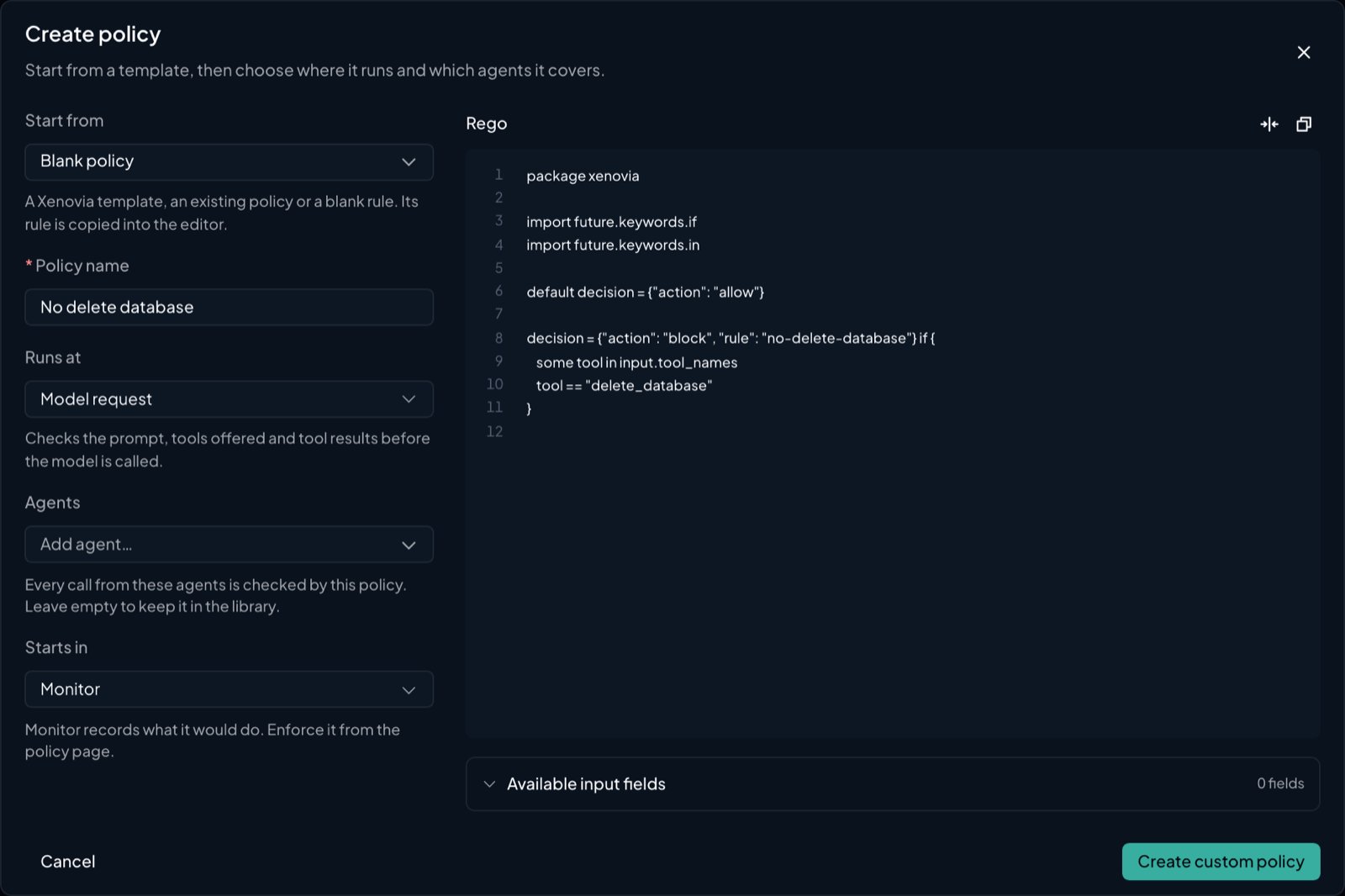
The Create policy form
Monitor, then Enforce
Every control in Xenovia can watch before it acts. A policy, a Neon risk family, the agent’s purpose check and each guardrail has a mode:- Monitor records what it would have done, on the session and in its counts, and changes nothing.
- Enforce acts: it blocks, redacts or escalates.
How policies run
Xenovia evaluates Open Policy Agent (OPA) Rego policies on every call to an agent. You write a policy once in the control plane and attach it to one or more agents. Each policy runs at one stage, chosen under Runs at when you create it:- Model request: checks the prompt, the tools offered and the tool results before the model is called.
- Model response: checks the model’s reply and the tool calls it proposes before your app gets them.
model_request checks, and response-stage policies on model_response and tool_call checks.
Enabled policies are compiled into each agent’s configuration. Each runtime instance revalidates that configuration at least every five minutes. OPA compiles with a 2-second timeout, and enforced policies get 200 milliseconds per stage to evaluate. If an enforced policy fails to evaluate (an error, a conflict or a timeout), the call is refused with 503. Monitor policies are evaluated on their own budget and never affect the call.
Policies, agents and modes
A policy covers every agent on its Agents tab. Each agent there has its own Mode:- Enforce acts on that agent’s calls.
- Monitor records what the policy would do and changes nothing. Its would-be decision is recorded on the trace.
The policy page
Through the API,
GET /api/v1/policies/{policy_id}/versions lists the versions, newest first. GET /api/v1/policies/{policy_id}/stats?days=7 returns the decision counts (1 to 30 days), and GET /api/v1/policies/{policy_id}/activity returns the change history.
The decision contract
A policy returns a singledecision object. This is the only value the runtime reads. allow/deny rules and a bare redact_fields set are ignored.
- Write
package xenovia. The control plane strips yourpackageline and re-packages the rule under a system namespace, so the package name you choose does not matter. actionsays what to do.ruleis a short identifier recorded on the trace and returned inX-Xenovia-Reasonaspolicy:<rule>. Any other key (includingreason) is ignored by the runtime.- Multiple complete
decisionrules must have mutually exclusive conditions. If two can be true at once with different values, OPA reports a conflict and the call fails closed. Guard each rule with distinct conditions, for example oninput.sub_agent.name. - A policy whose
decisionis undefined for a call (no rule matched and there is no default) allows it.
When you save, the Rego is compiled with
opa check --strict. A policy is also refused if it defines no decision rule, or if it writes an action the runtime doesn’t know. Each of these returns 422 with the diagnostics.Actions
A refused call gets a
200 refusal, not an error (see What a block looks like to your app). At the response stage, block and redact are read as block_response and redact_response.
When several enabled policies run at the same stage, the strongest action wins. At the request stage, block beats escalate, which beats redact, which beats allow. At the response stage the order is block_response, escalate, redact_response, then allow. The redact fields of every redacting policy are combined.
An action outside the stage’s list, such as deny or a response action at the request stage, fails closed. The runtime treats it as a block and records the error on the trace.
Redaction
Return the labels to strip inredact_fields:
email, ssn, phone, creditcard (Luhn-validated), ip, url. At the request stage, redaction applies to message text, tool descriptions and the Responses instructions field. At the response stage it applies to the reply text. Streamed replies are buffered and checked before any content is sent, so response redaction applies to them too.
Test a policy
When you create a policy in the dashboard, Test with a sample call runs the rule as written against a sample call in JSON. Nothing is saved. Through the API, pass up to 50conformance_cases when you create or update a policy. Each case has a name, an input in the policy input shape (a subset is fine) and an expect with an action and, optionally, a rule. The cases run when you save, and a failing case refuses the save with 422.
Policy input
Both stages receive the same base fields, and each stage adds its own.GET /api/v1/agents/{agent_id}/schema/policy-input lists the fields for one agent, with the stage each is available at.
Base fields (both stages)
Base fields (both stages)
input.tools lists every declared tool. family is function or custom for tools your code runs. For a tool the provider runs, it is the hosted tool family, such as web_search or mcp (see Hosted tools). input.tool_names lists only named tools, so a hosted tool such as web search may be in tools but not in tool_names. The sub-agent fields are described in Sub-agents. With the SDK, input.payload holds the payload your code sent.
Request stage adds
Request stage adds
Response stage adds
Response stage adds
Examples
Block a tool
Allow only known-safe tools
input.tool_names lists the names of the tools your app declared, exactly as sent; comparisons are case-sensitive. A hosted tool such as web search may be in input.tools without a name in input.tool_names, so use tool_names for your own tools and the hosted tool allow-list for the provider’s.
Escalate a destructive tool for human attention
Require the agent’s model to be on an allowlist
input.model is the model configured on the agent’s provider, so this rule guards against an agent routed to an unapproved model rather than a client choosing one.
Cap output tokens (request stage)
Block a refusal in the reply (response stage)
Templates
Instantiate a shipped template with its parameters instead of writing Rego. Several cover tool access directly, for example an approved-tool allowlist, tool-argument PII blocking, and tool-argument size caps. Thirteen templates were removed because the runtime never produces the inputs they read, or because they always escalated:pii-pattern-block, rapid-call-rate-block, repeat-denial-escalation, anomalous-tool-pattern-escalation, tenant-boundary-match, external-disclosure-consent-gate, block-shadow-model-fallback, low-confidence-escalation, high-risk-tool-human-approval, financial-threshold-escalation, eu-ai-act-fundamental-rights-review, destructive-tool-confirmation, and workflow-intent-aggregate-escalate. Policies you already created from them are unchanged; review whether they can still fire.
Neon and guardrails
Policies are deterministic rules. Neon, Xenovia’s decision model, judges each stage after them. It checks its trained risks, the guardrails you write in plain language, and the agent’s purpose and capabilities. Set it up on the agent’s Neon tab. See Neon for its stages, settings and what happens when it can’t be reached.Escalations
escalate is for actions you want flagged for human attention. When a policy escalates:
- The call is refused: a request-stage escalation refuses the request, and a response-stage escalation withholds the reply. Your app gets the refusal described above.
- An escalation is recorded, carrying the agent and the matched rule.
- Any alert rule with the Policy escalation trigger fires.
GET /api/v1/escalations (filter with status=open or resolved) and POST /api/v1/escalations/{escalation_id}/resolve with an optional note.
Recommended controls
- Least privilege. Blocklist high-risk tools explicitly rather than trusting a broad allowlist, and turn on Restrict hosted tools for agents that don’t need provider-run tools.
- Separate by environment. Use different agents, or different policies on one agent, for
dev,staging, andprod. Never share production credentials. - Flag irreversible actions. A policy
escalaterefuses deletions, financial writes and cross-system state changes and records them for review. A Neon guardrail with Allow and flag for review lets them through and records them. Either way they show up in Sessions. - Review from evidence. Traces show which tools are actually called. Remove rules for tools that no longer appear.
What next?

Neon
Catch what no rule named.

Hosted tools
Limit the tools the provider runs.

Sessions
See what a policy blocked, or would have.