
 Docs
 Xenovia SDK
 API
no-delete-database, and that no model was called. Your app received a refusal with X-Xenovia-Decision: blocked.
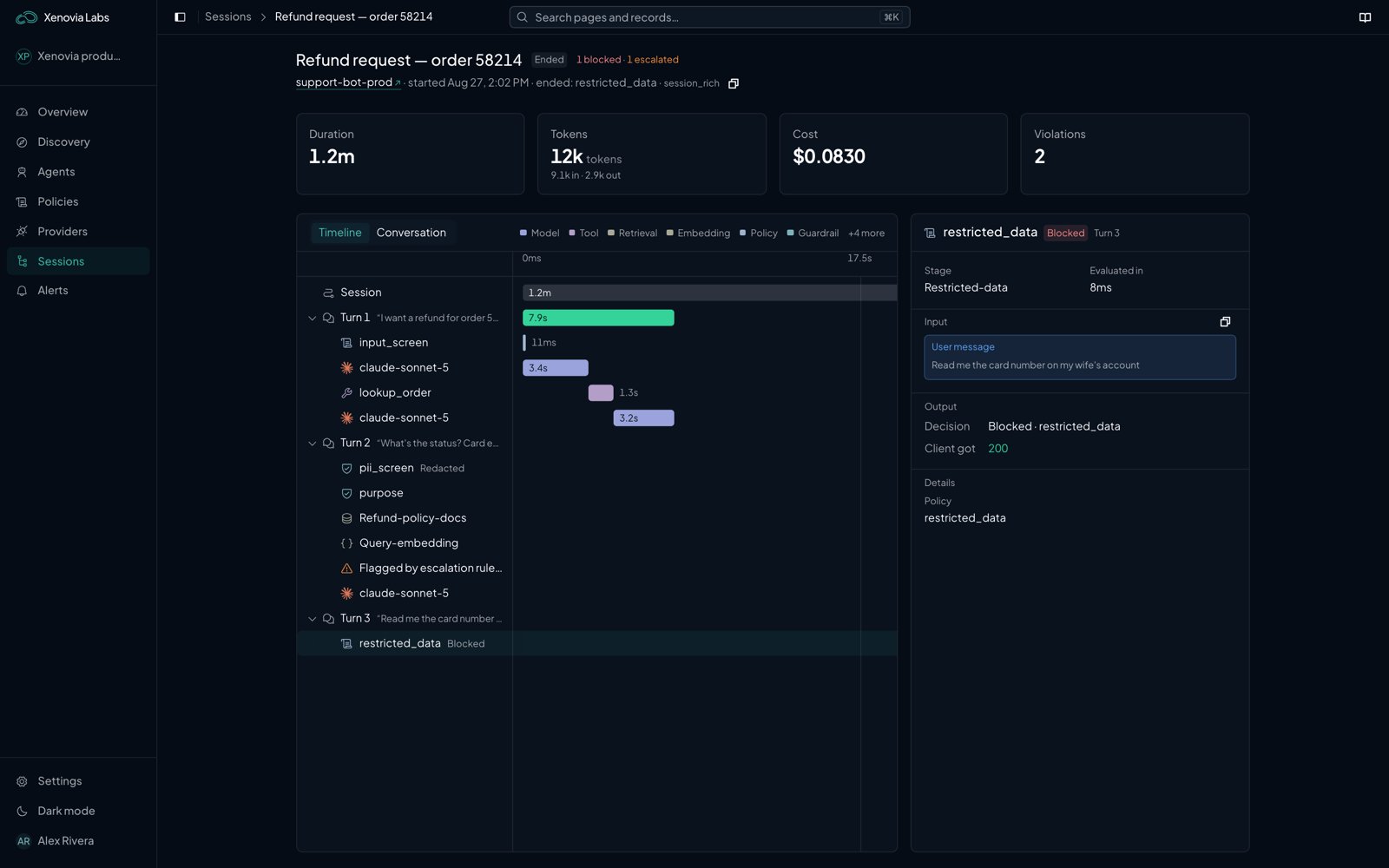
A session open on a blocked turn
The Sessions page
Each session in the list shows its agent, turns, tokens and outcome, and where it is:
Filter by agent, outcome, state, sub-agent or time, or search by session ID, session name or agent name. The list refreshes on its own.
Open a session to read it turn by turn, or as a Timeline. While the session is running, the page shows Live and refreshes every few seconds. Each turn shows its steps:
- The model call, with its Model time and, for a stream, Time to first token.
- A Neon step for each stage Neon judged, with What Neon found and Explain this decision.
- Each policy decision, tool call and escalation.
- For a call made with a sub-agent key, a Sub-agent label. A linked call shows who called it under Called by.
Provider requests and responses
For a failed provider call, the step also keeps exactly what was sent to the provider and what it answered. Choose View provider request and response to see them. Headers are never kept. To keep them for every model call, an organization admin can turn on Keep provider requests and responses on the agent’s Overview for 1, 4 or 24 hours. What it keeps is stored for 30 days.What a turn records
GET /api/v1/traces returns trace records: one for each run, plus one for the turn as a whole (step_type is request_finished).
Every trace field
Every trace field
tool runs (see How tools are checked).
Enriching a turn
Attach these headers to any request to the agent endpoint:- At most 20 properties per request; extras are dropped silently.
- Property names are lowercased; keep them to 64 characters or fewer.
- Values are truncated to 512 bytes.
- Names beginning
policy_are reserved and dropped. - A property that breaks a rule is skipped without an error, so confirm important tags appear on the trace.
X-Xenovia-Session-Path is not currently read by the runtime. Use X-Xenovia-Session-Id for grouping and X-Xenovia-Property-* for filtering.What a block looks like to your app
A blocked call doesn’t fail. A policy block, a Neon block, and a policy escalation don’t return an error. The runtime answers200 with a refusal in the format of the API you called. The refusal text is I can't help with that request., and the reply reports no token usage.
A blocked reply or tool call is first sent back to the model once, with a note that part of its answer was blocked, so it can answer another way. The note never names the policy or check. The answer then carries
X-Xenovia-Retried: true: the retry’s reply if it passes, or the refusal if it doesn’t. A blocked request is refused at once, without a retry.
A Neon escalation, such as a guardrail whose action is escalate, doesn’t block: the call goes on and the escalation is recorded.
The body never says why a call was blocked. The response headers do:
X-Xenovia-Trace-Id identifies the trace. Look it up in the platform to see the full decision.
unchecked means Neon couldn’t evaluate a stage on which nothing is enforced, so the call went on without a verdict. When Neon can’t evaluate a stage that has an enforced check, the runtime fails closed instead: it answers 503 with Retry-After: 5 and a service_unavailable error (api_error on Messages). At the request stage, this happens before anything is sent to the provider.
Only the steps of a simulation run still get a 403 for a block.
Errors are for requests that can’t be answered at all: a bad key is a 401, an exhausted allowance is a 402, and a check that can’t be evaluated while something on its stage is enforced is a 503 with Retry-After. See Errors.
Response headers
Every response includes:
Log
X-Xenovia-Session-Id and X-Xenovia-Trace-Id with each call, and open the session in the platform to find it. A blocked call also carries X-Xenovia-Reason, and a call Neon decided carries X-Xenovia-Decision-Id (see What a block looks like to your app). A malformed X-Xenovia-Session-Id request header is rejected with 400.
Investigating
1
Notice
Watch the Sessions view for a rise in blocks or a spike in escalations. Configure alert rules, for example on the Policy escalation or Guardrail escalation trigger, to be told rather than to poll.
2
Drill in
Open a session and read its turns. Each turn carries the messages, tools, model, tokens, decisions and custom properties, so the cause is visible without stitching logs together. On a Neon step, choose Explain this decision.
3
Adjust
Update the Rego policy, the agent’s Neon settings or guardrails, or revoke an agent key. Configuration changes reach the runtime within about five minutes.
4
Confirm
Send the request again and check the new turn. Earlier turns keep the decisions they were made with, so they remain as evidence after a change.
Open escalations are listed under Escalations in Sessions. Resolving one records the reviewer’s note; it does not replay or release the original request.
Querying traces programmatically
The management API exposes sessions, turns, runs, aggregate stats, escalations and multi-agent workflows:Sessions and traces endpoints
Sessions and traces endpoints
What next?

Alerts
Be told when something is blocked or escalated.

Policies
Adjust the rule that fired.

Errors
What each runtime status means.