
 Docs
 Xenovia SDK
 API
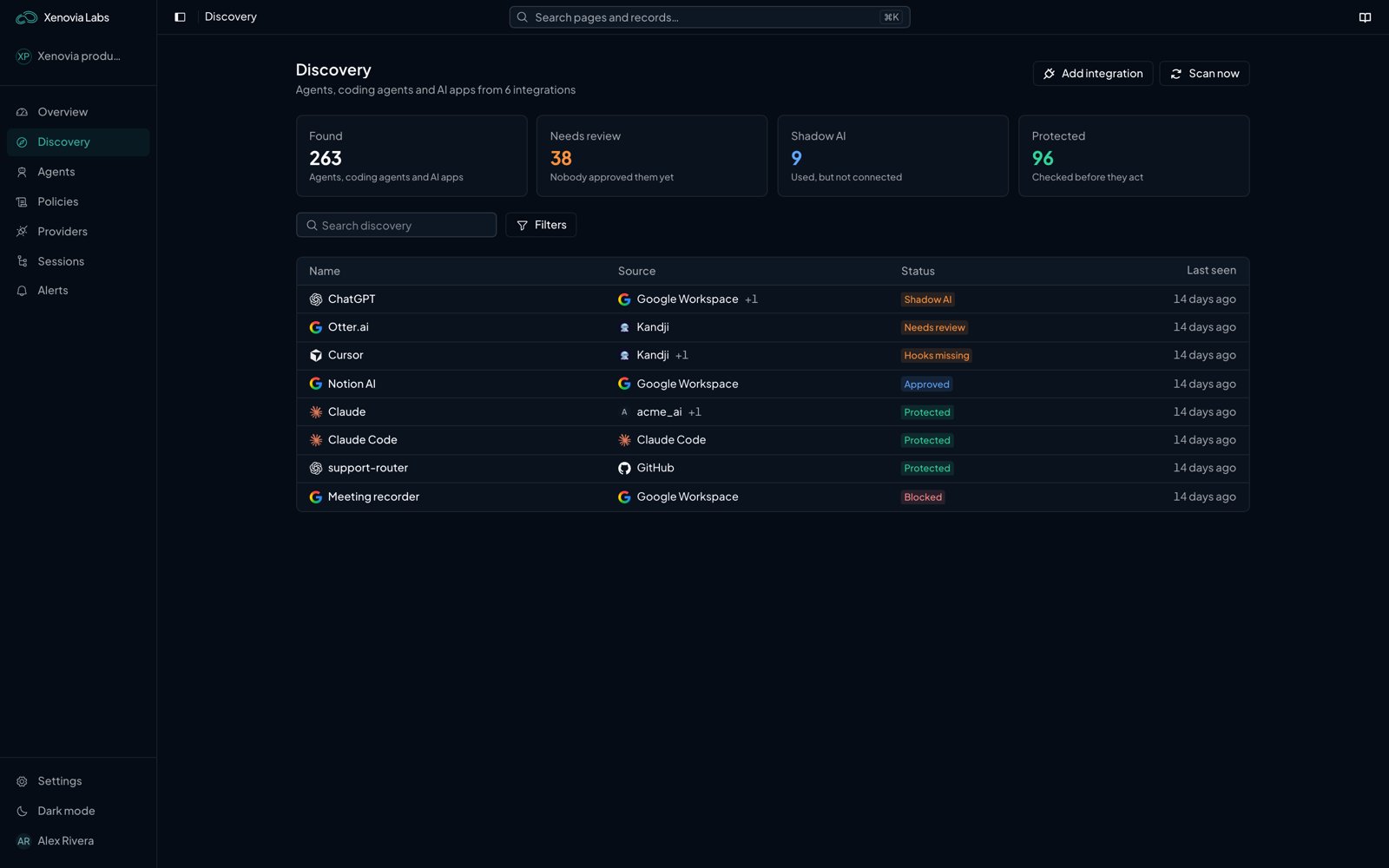
The Discovery page
Where the entries come from
Each integration adds what it can see. An app that several integrations see is one entry, with every source listed under Found by.
Calls that go through a Xenovia agent add Went through the Xenovia gateway. Identity providers and device management see every app, not only AI: Xenovia keeps the apps its AI app catalog recognizes and skips the rest.
The Discovery page
The table lists each entry with its Name, Source, Status and Last seen. Search it, or filter by Type (Agents, Coding agents, AI apps), source and status. When GitHub is connected, Scan now scans your repositories again.
An entry’s status is worked out from what is open against it. The first that applies wins:
Findings
A finding is one thing wrong with an entry. It is Reported by an integration (for example a GitHub scan), comes from Xenovia’s checks, or was Found while planning. Xenovia’s checks run over everything Discovery knows after every sync, scan, review, connect or disconnect, and once a day:
A finding is Open until the next scan or check no longer reports it; then it is Resolved, and it opens again if it comes back. An admin can mark a finding Accept risk, with a reason. An accepted finding stays closed until someone chooses Reopen.
From a finding to a governed app
For an agent found in your code, see GitHub. For an AI app or platform:1
Plan a fix
Open the entry and choose Plan a fix. Xenovia looks at the entry, its open findings and what your connected integrations can do, and proposes one or more fixes: Connect an integration that governs the app, Route it through Xenovia for an app whose traffic can go through an agent endpoint, or Block or remove it through a connected identity provider or device management integration when nothing can govern it.
2
Apply it
Choose Apply to make a change, or Discard. Xenovia checks again on the next scan.
Entry pages
A device found by Jamf or Intune has its own page: the person, platform and serial number, and the AI tools installed on it.
Who can do what
Every member of the organization can read Discovery. Only admins can add integrations, start a scan or a plan, apply a setup or a fix, review an entry, and accept or reopen a finding. Repository scans and plans use AI credits. While your organization has none left, scans and plans don’t run.What next?

Connect GitHub
Find the agents in your code.

Add an integration
See the AI apps your people use.

Protect a coding agent
Check what Claude Code, Codex or Cursor does.